Plex stops using TheTVDB as a metadata source on December 3, 2026. If a TV library or show uses TheTVDB episode ordering and follows a normal season order, switch Episode ordering to The Movie Database. If a show depends on DVD or absolute order, leave it alone for now: Plex doesn't support the replacement for those orders yet. Your video files and existing metadata are not being removed.
The details below come from the Plex announcement of November 20 and Plex's support pages, checked on November 22. Plex says it could not reach terms on a new agreement with the company that owns TheTVDB.
What changes on December 3, and what doesn't
- Existing libraries: settings, shows and current metadata stay as they are.
- Finished shows: little changes, because their episode details are already complete.
- Ongoing shows on TheTVDB ordering: new episodes and seasons stop getting details from TheTVDB. Plex says it will try to match them against its other sources.
- The legacy TheTVDB agent: it stops working. Shows or episodes added later will not be matched.
Metadata means titles, plots, air dates, posters and the numbering that matches a file to an episode. This change does not touch your media files.
Check whether you are affected
Open Plex in a web browser as the server owner and check three places:
- Edit each TV library, select Advanced and read Episode ordering.
- On the same screen, read the Agent. The current default is called Plex Series. A legacy TheTVDB agent needs replacing.
- Edit any show you customized in the past and check its own Advanced tab. A show's setting overrides the library's setting.
If everything already says The Movie Database (TMDB) and you use Plex Series, you don't need to change anything. If you only watch someone else's shared server, this is a job for the owner.
How to switch from TheTVDB to TMDB
Start with one show, because the two databases sometimes split seasons differently.
- Write down the show's current season and episode numbers, or take screenshots.
- Edit the show, go to Advanced and set Episode ordering to The Movie Database.
- Refresh its metadata, then compare a few episodes at the start, middle and end.
- If they match, edit the library and make the same change under Advanced.
- Go back to shows with their own setting. Changing the library alone will not move them.
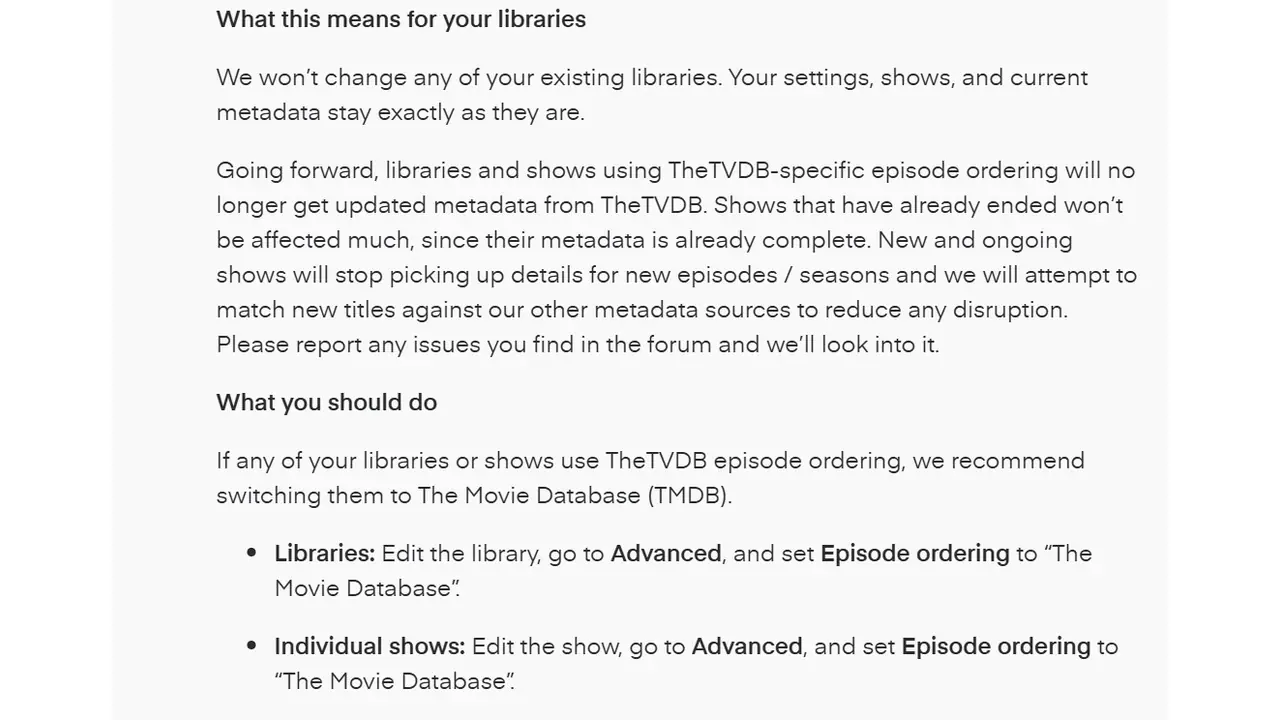
Plex describes this setting as the way episodes are named and numbered on disk. If your files follow TheTVDB numbers and TMDB counts differently, an episode can show the wrong title after the switch. That is why the one-show test matters.
Which shows should you leave on TheTVDB for now?
Plex's own advice is that you may want to wait if a show depends on an alternate order:
- Anime numbered in absolute order, such as episode 137 in place of a season and episode.
- Series ripped from discs and numbered in DVD order.
- Any show where your test produced mismatched titles.
Plex plans to support TMDB episode groups, which cover alternate orders, in a future release. It has not given a date. Until then, those shows keep the metadata they have but get no TheTVDB updates. Avoid mass-renaming files to fit an order you may change again.
If you use the legacy TheTVDB agent
Plex has deprecated legacy agents for several years. Its metadata agents guide links to the migration steps for the Plex Series agent and scanner. Note the warning on that page: changing a library's agent affects future content and does not retroactively change the agent for items already there. Follow the migration article and test a small library first.
Common questions
Will Plex delete my TV shows on December 3?
No. Plex says it won't change existing libraries. The loss is future updates from one database.
Is there a deadline time for the US, UK or Switzerland?
Plex gave the date but no hour or time zone. Finish your checks by December 2 wherever you live.
Do I need Plex Pass to change episode ordering?
Plex's settings page marks the features that need Plex Pass, such as intro detection. Episode ordering has no such mark.
Does this affect Jellyfin, Emby or Sonarr?
Plex's announcement covers only Plex. It does not announce a change to TheTVDB for other apps.
If this has you rethinking your setup, compare open-source alternatives to paid software, see our picks of free open-source Android apps, and learn how to install and update them safely.