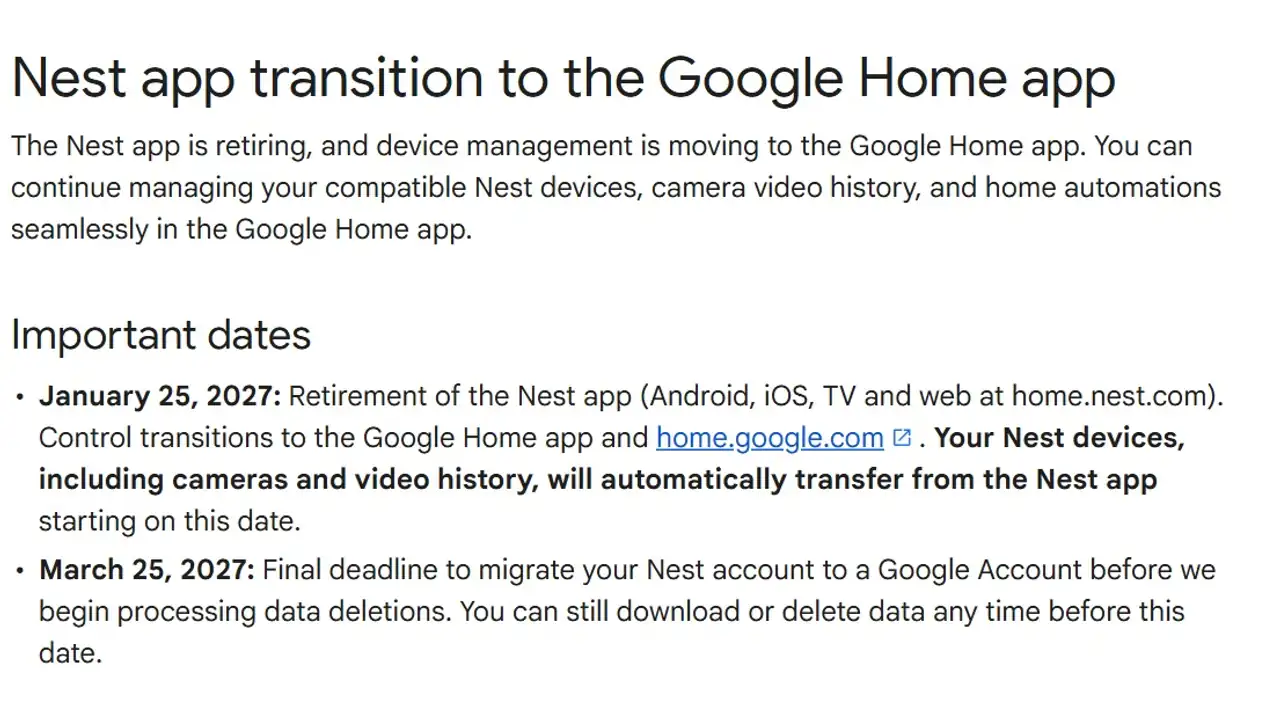
The Nest app shuts down on January 25, 2027. Your supported devices and recent camera history move to Google Home automatically, but clips saved in the Nest web library do not. Download those from home.nest.com before that date. If you still sign in with a separate Nest password, also move to a Google Account: Google starts deleting accounts that haven't migrated on March 25, 2027.
This checklist follows the Nest app transition page on Google Help, checked on November 22, 2026.
The two dates to put in your calendar
- January 25, 2027: the Nest app retires on Android, iOS, TV and the web. Transfers to Google Home begin.
- March 25, 2027: the final date to migrate an old Nest account before Google begins deleting its data and subscriptions.
1. Download your saved Nest clips
- On a computer, sign in at home.nest.com.
- Open your saved clips.
- Use Download All, then open a few files to make sure they play.
- Copy them to a second place, such as an external drive or cloud storage.
If you need long footage, make it now. The Nest website can create clips of up to one hour and timelapses of up to 24 hours. Google Home on the web caps clip downloads at five minutes and can't create timelapses.
2. Check which account you use
Anyone who started with the Nest app after August 19, 2019 already has a Google Account. If you tap Sign in with Google and see your home, you are done. If you use Sign in with Nest:
- Update and open the Nest app.
- Go to Settings > Account.
- Tap Migrate to a Google Account and follow the prompts.
Read the prompts first. Google says migration cannot be reversed, home members may need a new invitation, and the Nest app on Apple TV and Android TV stops working once you migrate. A personal Google Account gives the fullest features.
3. See if your device is on the supported list
- Thermostats: Nest Learning Thermostat 3rd and 4th gen, Thermostat E, the 2020 Nest Thermostat, and both generations of Temperature Sensor.
- Cameras and doorbells: Nest Cam Indoor and Outdoor 1st gen wired, both Cam IQ models, Nest Hello, the Hub Max camera, and all models launched in 2021 or later.
- Smoke and CO alarms: Nest Protect 2nd gen, until the expiration date printed on it.
- Locks: Nest x Yale with Nest Connect.
The first-generation Nest Protect and the first two Learning Thermostats are not on Google's list. If you have one, ask Google support before you rely on app control or phone alerts.
4. Decide whether to move early
Thermostats, locks and Protect alarms appear in Google Home after you sign in with the linked account. Older cameras can be transferred from their device settings in Google Home version 3.26 or later, in up to 25 minutes each. Cameras with a first-generation Nest Aware plan have to wait until January 25.
There is a reason to wait. Google lists features Home doesn't have yet, including changing Wi-Fi without a reset, email notifications, timelapses and public livestream sharing. After a camera moves, you also have to set up presence sensing again.
What happens to Nest Aware?
First-generation Nest Aware becomes Google Home Premium Advanced on January 25:
- If you pay under $20 a month, you keep that price for the first year.
- If you pay over $20 a month, the plan drops to $20 a month or $200 a year for all compatible cameras.
- If you have 30 days of 24/7 recording, the window shrinks to 10 days, plus 60 days of event history.
Those are US-dollar figures. The transition page gives no pound or franc prices, so UK and Swiss customers should check the amount on their own subscription page.
Common questions
Will my thermostat or camera stop working?
Google says devices keep working in your home. You lose control through the Nest app, so install Google Home to keep remote access. ADT systems are not affected.
What if I miss January 25?
Subscribed cameras on an unmigrated account keep recording until March 25, and you can see that footage once you migrate. Don't count on the same grace period for the clip library.
Before you start, make space with our guide to freeing up Android storage, and keep the saved Wi-Fi password handy in case a camera needs a reset. Choosing a new smart home app? See whether Apple HomeView works with Android.