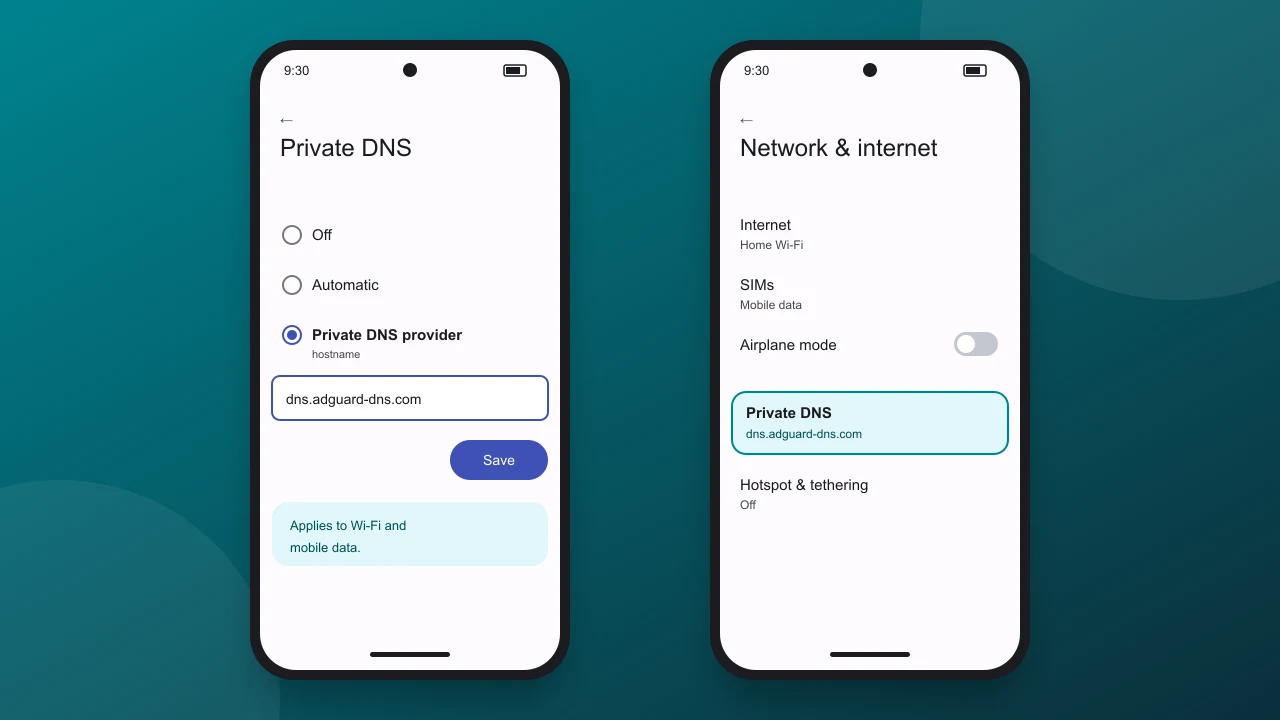
Android's Private DNS setting can block many ads, trackers and phishing sites for every app on your phone, on both Wi-Fi and mobile data. Open Settings > Network & internet > Private DNS, choose Private DNS provider hostname, enter dns.adguard-dns.com and tap Save. No app or account is needed, and you can switch it back to Automatic at any time.
What Private DNS does
Every time an app or website connects to a server, your phone first asks a DNS service for that server's address. Private DNS sends these questions to a provider you choose, over an encrypted connection. Cloudflare's setup guide says Android 9 and later supports this through DNS-over-TLS, and that the phone then uses that provider on all networks, including mobile data.
Some providers refuse to answer for addresses on their block lists. When an app asks for a known ad or tracking server, it gets no answer, so the ad doesn't load. That is why one setting can work across your browser, apps and games at the same time.
Google's Android help page adds an important limit: Private DNS helps secure only DNS questions and answers. It doesn't hide which sites you visit from the sites themselves, and it is not a VPN.
How to turn on Private DNS
- Open the Settings app.
- Tap Network & internet > Private DNS. If you can't find it, search Settings for "Private DNS". On some phones it is under a "More connection settings" menu.
- Choose Private DNS provider hostname.
- Type one hostname from the list below, exactly as written, and tap Save.
- Open a few websites and apps you use every day to check that they still load.
Google notes that some of these steps work only on Android 12 and later. On older phones the menu may be under Settings > Network & internet > Advanced.
Which hostname should you use?
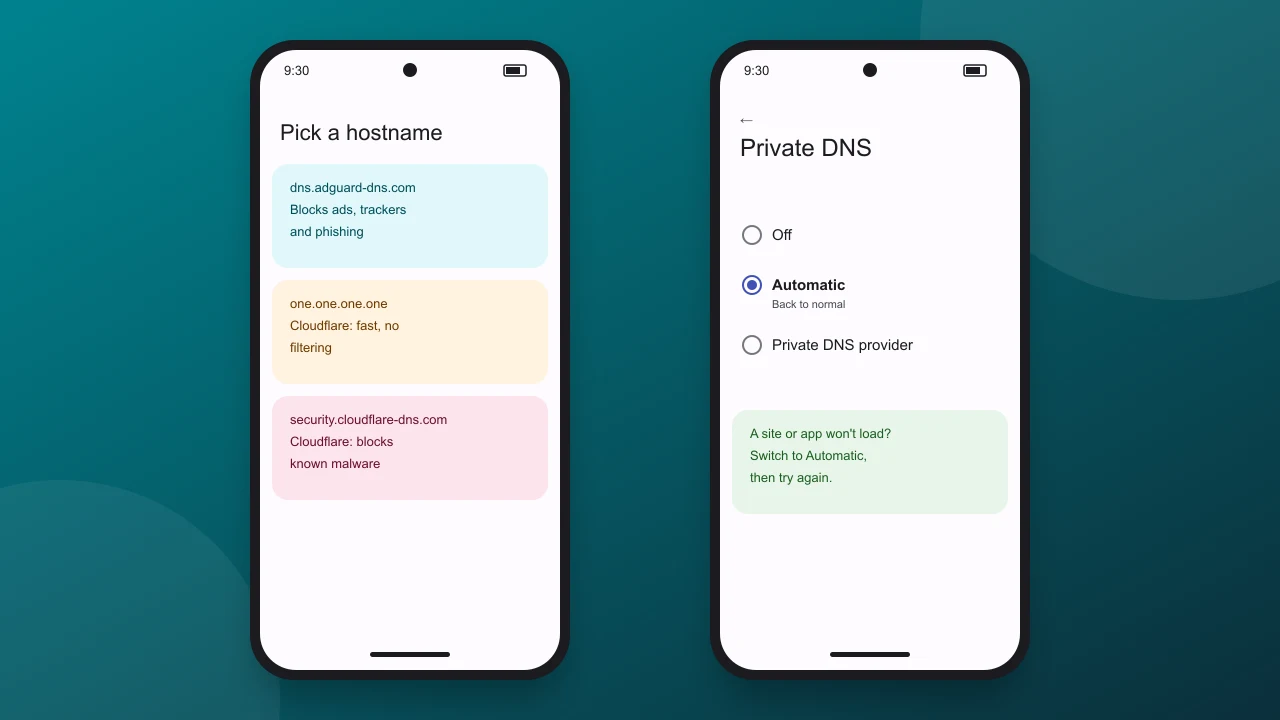
dns.adguard-dns.comblocks ads, tracking and phishing. This is the address of the default public AdGuard DNS servers in AdGuard's server list. Use it if blocking ads is your main goal.one.one.one.oneis Cloudflare's resolver with no filtering. Use it if you only want encrypted DNS and no blocking.security.cloudflare-dns.comis Cloudflare's 1.1.1.1 for Families option that blocks malware.family.cloudflare-dns.comblocks malware and adult content, which suits a child's phone.
All four are free and need no sign-up. You can change your choice any time from the same screen.
What Private DNS can't block
- Ads from the same server as the content. If an app serves its ads from the same address as its videos or posts, DNS can't separate them, so those ads usually still show.
- Ads that are already in the app. Some apps bundle promotions inside the app itself.
- Everything except DNS. As Google says, Private DNS protects only DNS questions and answers. For scam calls and texts, follow our Android scam protection checklist.
If a site or app stops working
Filtering sometimes blocks something you need, such as a shopping link that goes through a tracking address, or a login page. Go back to Settings > Network & internet > Private DNS, choose Automatic and tap Save. Try again, then switch the filter back on afterwards. If it happens often, use one.one.one.one, which doesn't filter.
Google recommends keeping Private DNS turned on. By default, Android uses it with any network that supports it. Off is rarely the right choice.
Private DNS or an ad-blocking app?
Ad-blocking apps for Android usually work by running a local VPN on your phone. That lets them show which app made each request and set different rules for each app. However, Android allows only one VPN at a time, so you can't use one alongside a regular VPN. Private DNS needs no app, keeps running after a restart and leaves the VPN slot free. For most people, Private DNS is the simpler choice. Try an app only if you need per-app control or a list of what was blocked.
More ways to protect your phone
- Check which apps can find devices on your Wi-Fi in our guide to the Android 17 local network permission.
- Use a password manager so that a fake login page can't capture your password. Our open-source password manager guide compares three free options.
- Install apps only from trusted sources. Browse checked listings in our apps catalog.
Common questions
Does Private DNS slow down my phone?
Not noticeably for most people. DNS lookups are small, and big providers have servers in many countries. If pages feel slow after the change, try a different hostname.
Does Private DNS work on mobile data?
Yes. Cloudflare's guide says that once you set Private DNS, Android uses that provider on all networks, including cellular.
Is this the same as a VPN?
No. A VPN routes all your traffic through another server. Private DNS changes only who answers your phone's address lookups, and it encrypts those lookups.