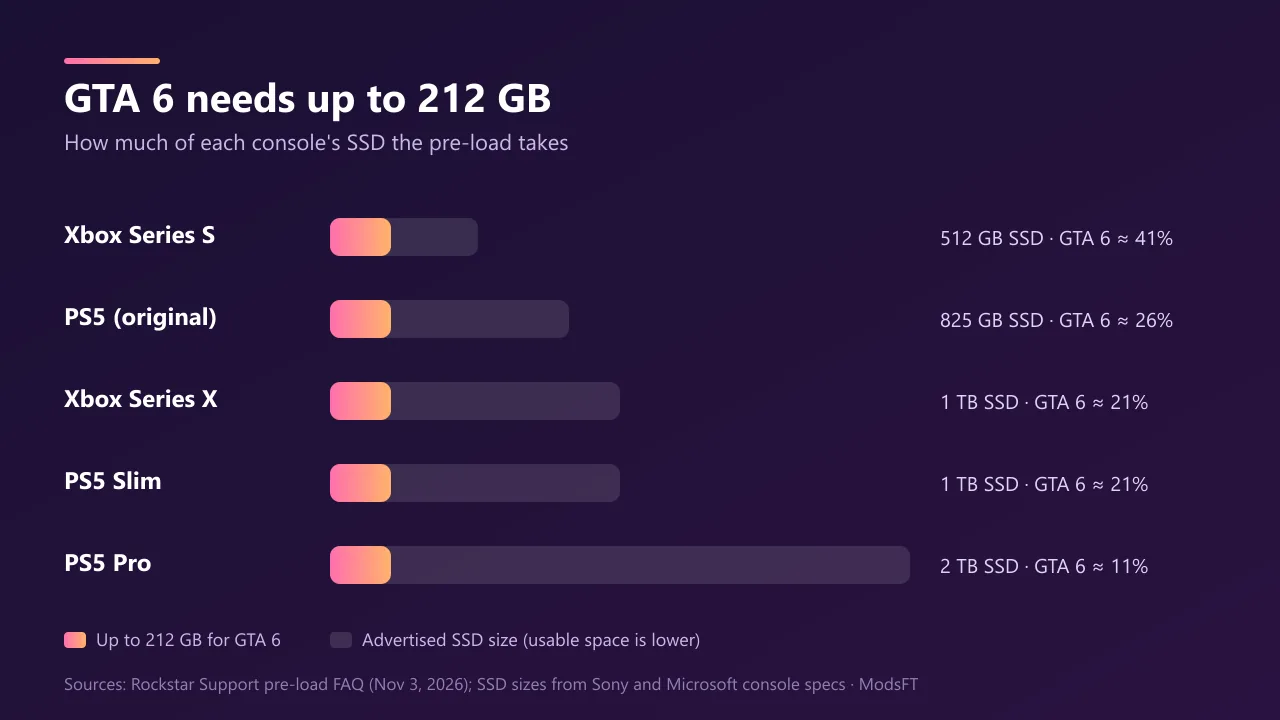
GTA 6 needs up to 212 GB of free space to pre-load, depending on your console, according to Rockstar's pre-load FAQ. That is about 41% of an Xbox Series S's advertised 512 GB drive, and the space you can actually use is smaller than the advertised size. The game also has to run from fast internal storage or an approved expansion drive. A cheap USB hard drive can hold it but cannot run it.
Here is how to check your space, what storage works, and how to clear room quickly before November 19.
Step 1: Check how much space you really have
Advertised sizes include space the system keeps for itself, so look at the free space your console reports:
- PS5: go to Settings > Storage > Console Storage. It shows free space and what is using the rest.
- Xbox Series X|S: go to Settings > System > Storage devices and select the internal drive.
Aim for more than 212 GB free. The 212 GB figure is Rockstar's pre-load requirement, and updates after launch can need extra room, so a little headroom saves you from deleting things again next week.
Step 2: Know which drives can run GTA 6
This is where most people get caught out:
- PS5 USB drives store games but can't run them. PlayStation's support page says PS5 games can't be played directly from USB extended storage. You can park older PS5 games there and copy them back later. PS4 games can still run from USB, so moving your PS4 library is a quick win.
- PS5 M.2 SSD: an M.2 SSD installed in the console's expansion slot acts like internal storage and can run PS5 games.
- Xbox Storage Expansion Card: Xbox says the official card (512 GB, 1 TB or 2 TB) performs identically to the internal SSD and can run games optimized for Series X|S, so GTA 6 can live there.
- Xbox USB drives: good for storing Series X|S games and running older Xbox One games, but optimized games have to be moved back to the internal SSD or the expansion card to play.
Step 3: Clear room the fast way
- Sort by size. Both consoles can sort installed games by size. The biggest one or two games often free 100 GB or more on their own.
- Move instead of delete. If you have a USB drive, move PS5 or Series X|S games you are not playing to it. Copying them back later is faster than downloading again.
- Delete captures. Gameplay videos add up. Check the Media Gallery on PS5 and Captures on Xbox.
- Remove unused add-ons. Some games let you uninstall single-player campaigns, high-resolution packs or other modes you no longer play.
- Keep your saves. Deleting a game keeps its save on the console and, with cloud saves on, online. Check before you delete anything you care about.
Step 4: Make sure the pre-load actually happens
Rockstar's FAQ lists two settings so the download runs while you sleep:
- PS5: turn on auto-downloads, and leave the console on or in Rest Mode.
- Xbox Series X|S: turn on automatic updates, and leave the console on or in Sleep mode.
PS5 pre-loading opened at midnight local time on November 10, and Xbox pre-loading opened at 12 a.m. GMT that day, so if you pre-ordered digitally you can start now. Code-in-box copies can be activated once the code arrives.
No space at all? Stream it instead
If you own an Xbox and can't free enough space, Xbox says GTA 6 will stream through Xbox Cloud Gaming from 1 a.m. ET on November 19. It needs no install, uses Series S graphics settings, and you still need to buy the game. Our guide to every way to play GTA 6 covers cloud and Remote Play in detail.
Questions people are asking
How many GB is GTA 6 on Xbox Series S?
Rockstar gives one figure for all consoles: up to 212 GB, depending on the device. It has not published a separate size for each model, so plan for the full 212 GB on a Series S.
Is 512 GB enough for GTA 6?
Yes, if most of it is free. The pre-load fits on a Series S, but it leaves little room for anything else, so expect to move or delete other big games.
Can I play GTA 6 from an external hard drive?
Not from a regular USB drive on PS5, and not from a USB drive on Xbox for games optimized for Series X|S. Use the internal SSD, an M.2 SSD on PS5, or the official Storage Expansion Card on Xbox.
Is my phone storage relevant?
Only if you play older Rockstar games on Android. Our guide to freeing up storage on Android covers phones, and the ModsFT games catalog lists official Android games.